

The Stack
Catalyst is built around a specific development environment. It’s not trying to be universal — it’s trying to be excellent for one workflow. This page tells you exactly what that workflow looks like, so you can decide whether to jump in.
Who This Is For
Section titled “Who This Is For”Catalyst is for developers who like to tinker. You’re comfortable spinning up a Docker Compose stack, installing CLIs you haven’t used before, and experimenting with new platforms. You might fork this repo and reshape it for your own workflow.
This is not a one-click installer. It’s not a polished, end-to-end package that’s been battle-tested by tens of thousands of users. It’s a working toolkit that one developer uses daily, released so others can benefit from the patterns and adapt them.
The Development Environment
Section titled “The Development Environment”Core (Required)
Section titled “Core (Required)”| Tool | Role |
|---|---|
| Claude Code | The AI engine everything plugs into |
| GitHub | PRs, issues, CI/CD |
| Git | Worktrees, branching, thoughts system |
| macOS | Primary supported platform |
Task Management
Section titled “Task Management”| Tool | Role |
|---|---|
| Linear | Task management, cycle tracking |
| Linearis CLI | Linear integration for Claude Code |
Observability
Section titled “Observability”| Tool | Role |
|---|---|
| OpenTelemetry | Structured telemetry from agent runs |
| Grafana | Dashboards, alerting, log exploration |
| SQLite | Local session store and cost tracking |
Development Environment
Section titled “Development Environment”| Tool | Role |
|---|---|
| direnv | Per-project environment variables, API key isolation, OTel context |
| Warp | Terminal — automation for orchestrating worktrees and kicking off code agents (optional, not required) |
| Bun | Runtime for scripts and tooling |
AI Agents (Beyond Claude Code)
Section titled “AI Agents (Beyond Claude Code)”| Tool | Role |
|---|---|
| Devin | Autonomous coding agent |
| Codex | OpenAI’s coding agent |
Catalyst skills can orchestrate handoffs between these agents and Claude Code.
How I Actually Work
Section titled “How I Actually Work”Catalyst grew out of friction I hit using other orchestration tools. A short tour of what I’ve tried and where I’ve landed:
- Code Layer (HumanLayer) — A daily driver for a while. HumanLayer popularized the research-plan-implement loop and combined context engineering with opinionated multi-agent workflow management. The team has since pivoted to a new product called Riptide, and Code Layer hasn’t seen meaningful updates in a while. I’m still on the waitlist for Riptide.
- Conductor.build — My daily driver before Catalyst-native orchestration, and I still reach for it for single-threaded work. Responsive team, clean tabbed UI for multiple agents, solid Linear integration — Catalyst runs fine inside Conductor. Its constraint: it’s built around single-branch, single-worktree sessions. Great for Level 2, but it doesn’t have first-class support for forked agents (worktrees that spawn other worktrees), which is what Catalyst’s
/orchestrateskill and Claude’s teams/swarm features need. That gap is what pushed me to build wave-based orchestration here, plus the Catalyst Monitor web dashboard. - Warp — My current terminal. I’ve been experimenting with its vertical tabs and automated tab templates for spinning up agent worktrees. Still dialing it in, but it’s become my daily driver.
What’s open on my screen while I’m shipping:
- Warp
- Catalyst Monitor (web UI) — live view of orchestration waves and worker status
- Linear — tickets and cycle state
- Grafana — Claude OpenTelemetry dashboard for token and cost monitoring
- GitHub (or GitKraken) — to watch PRs open, CI run, and merges land
What This Means for You
Section titled “What This Means for You”If your stack looks like this, Catalyst works out of the box. Install the plugins, run the setup script, and you’re in a working workflow within minutes.
If you’re on Windows, use Jira instead of Linear, or prefer a different AI coding tool — Catalyst may still be useful for ideas and patterns, but you’ll be adapting rather than installing. There’s no active effort to add support for alternative task managers, IDEs, operating systems, or AI providers. This is a working toolkit, not a framework.
You’re welcome to fork the repo and adapt it for your own stack. That’s part of why it’s open source.
A Note on Security
Section titled “A Note on Security”Installing these plugins means installing code that runs on your computer — or has the potential to run on your computer.
Don’t trust me or anybody else. You should review anything you install into Claude Code. At minimum, use GitHub’s code scanning (Copilot or CodeQL) to run a security check on this or any other plugin before installing it.
Catalyst bakes security checks and security reviews into its own CI/CD pipeline. But of course, that’s exactly what someone would tell you if they were trying to put something nasty on your machine. Run your own scans. Read the code. Trust your own review, not someone else’s assurances.
A Note on Harnesses
Section titled “A Note on Harnesses”Harnesses like Catalyst exist because we still need to steer raw models toward the specific engineering behaviors — research, planning, validation, handoffs — that give us confidence shipping real software. I’m drawing from the best pieces I’ve found across other systems plus my own, and I’ll keep improving this until something genuinely better shows up. Eventually the models may be powerful enough that most of this scaffolding isn’t needed and they figure it out from first principles — until then, the harness is the thing.
Start at Level 2
Section titled “Start at Level 2”Catalyst describes three levels of AI-assisted development (detailed in Beyond Prompt and Pray):
- Level 1 — Prompt and generate. Basic AI code completion.
- Level 2 — Structured workflows. Research, plan, implement, validate — one ticket at a time.
- Level 3 — Orchestrated parallelism. Multiple agents working across multiple tickets simultaneously.
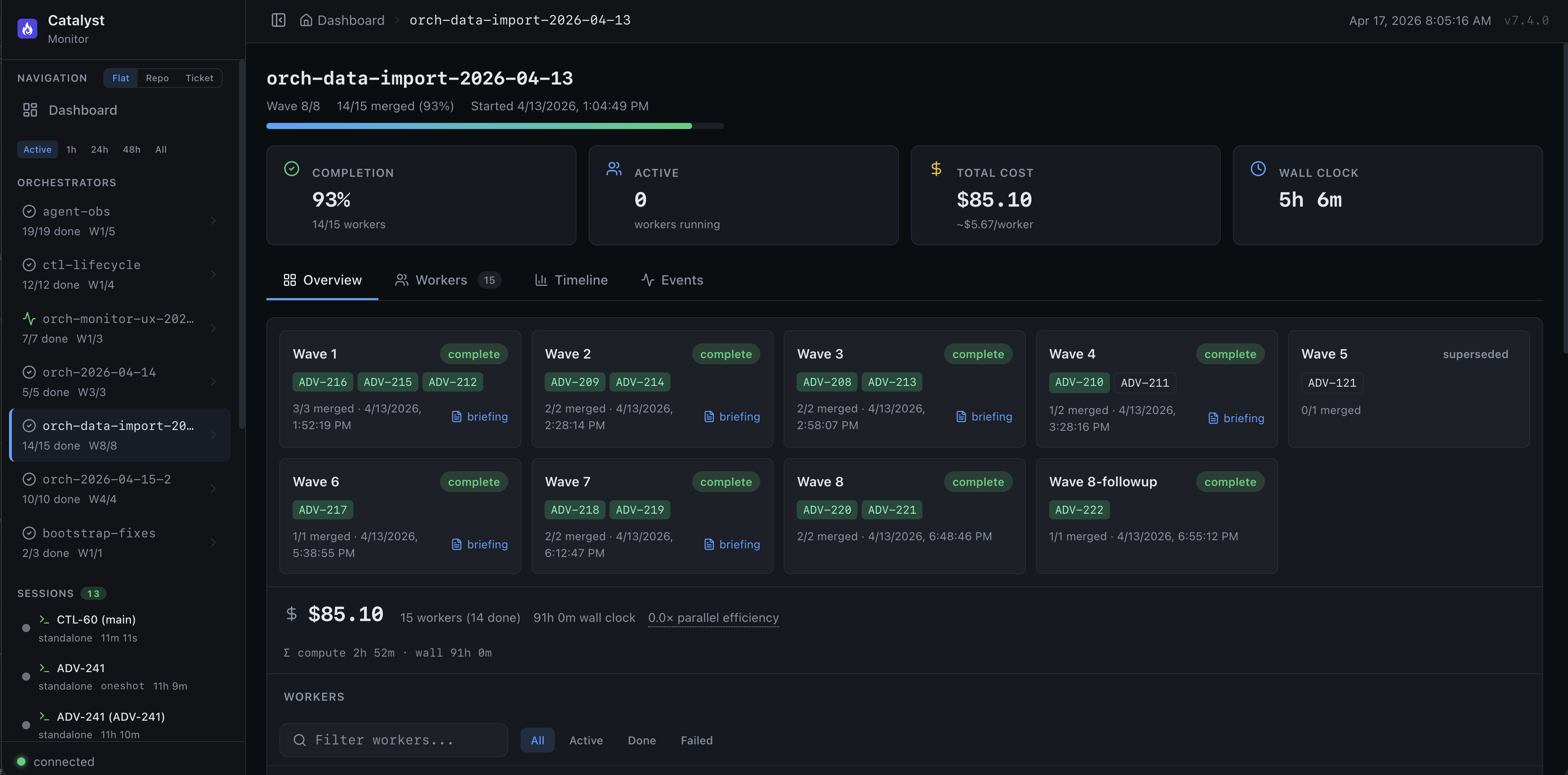
Level 3 in practice — the Catalyst Monitor tracking nine waves of parallel agents on a single orchestration run.
Start at Level 2. Spend real time there. Work ticket by ticket through the research-plan-implement cycle. Get a feel for what’s happening under the hood. Understand how context flows between phases, how handoffs work, how the AI reasons about your codebase.
Ship with rigor and confidence at Level 2 before you think about Level 3. If you jump straight to orchestrating parallel work streams, you’ll burn through tokens fast and get frustrated when things go sideways — because you won’t have the mental model to debug what went wrong.
Level 3 is powerful, but it assumes you already know how each individual workflow phase behaves. Master the single-ticket workflow first.